Free Budget App & Expense Tracker. Your Money Stays on Your Phone.
Budget Tracker Features — Manage Every Dollar Offline
Track expenses, budgets, loans, savings goals & investments — all offline with AES-256 encryption. No subscriptions. No cloud. The best free expense manager and money tracking app for Android.

Multi-Account Expense Manager Dashboard
Track bank accounts, cash, wallets, credit cards & investments in one money tracking app dashboard. See your entire net worth update in real time.

AES-256 Protected
Bank-level AES-256 encryption protects your budget data on your device. No cloud. No accounts.

Encrypted Backup
Back up your budget data to Google Drive with end-to-end encryption. Restore instantly.

Spending Insights
Visual spending breakdowns, category analysis, and exportable PDF financial reports.

50+ Currencies
From USD to INR to EUR — pick your currency and format. Everything adapts instantly.

Savings Goal Tracker
Set savings targets, track milestones, and watch your savings grow day by day toward your financial goals with smart projections.

Bill Reminders
Automated alerts for subscriptions and recurring payments. Never miss a payment again.
Free Forever
No subscriptions. No sign-ups. All core features unlocked. Forever.
Best Budget App for Android — See It in Action
Powerful personal finance app with a clean interface — the best budgeting app running 100% offline on your Android device.
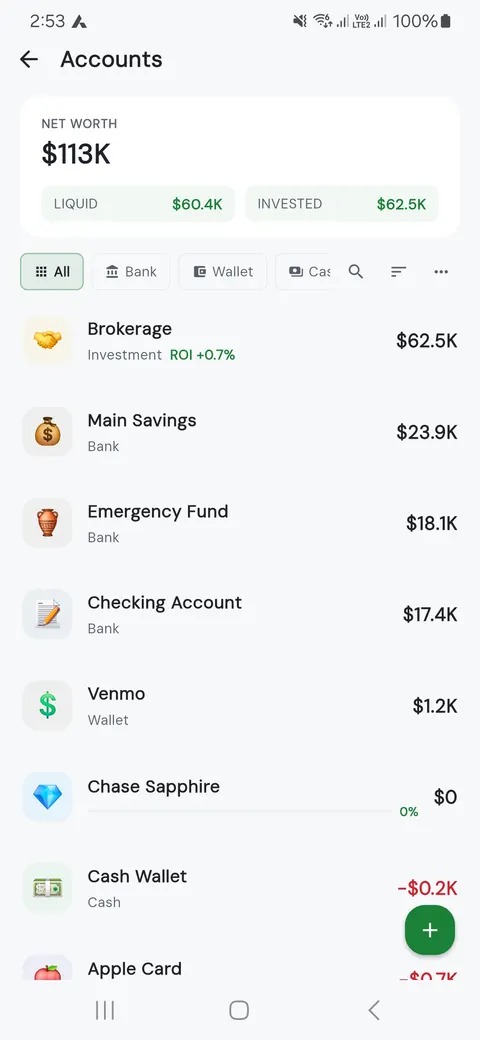
Net Worth & Account Balance Tracker
Every account. Every balance. One screen. See exactly where you stand financially — updated the second you log a transaction.
- 💳 Bank, cash, wallet, investments
- 📈 Live net worth tracking
- 💰 Liquid vs. invested breakdown
- 📊 One-tap account overview
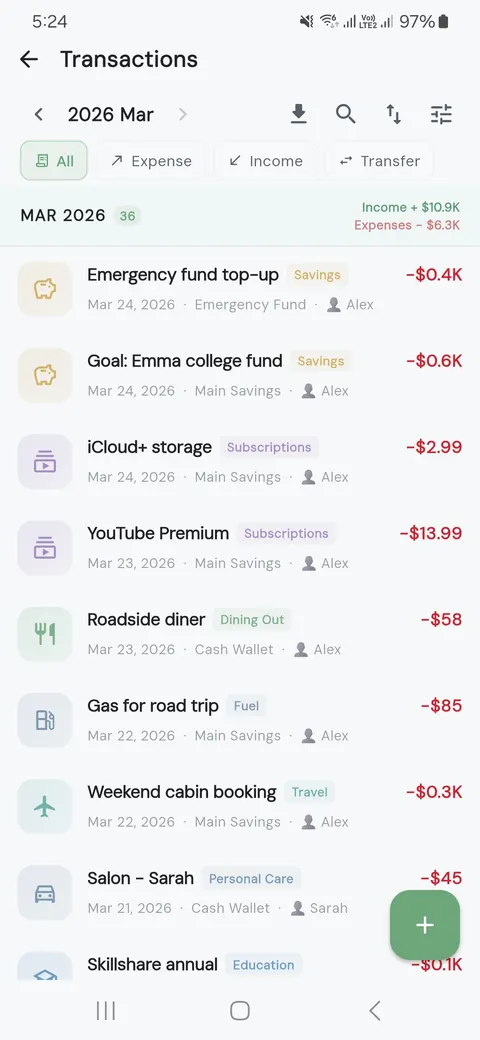
Daily Expense Tracker & Money Logger
Log expenses in 3 seconds. Search, filter, tag — find any transaction instantly. Export to CSV anytime.
- 🌐 50+ currencies supported
- 🏷️ Auto-categories & custom tags
- 📎 One-tap CSV export
- ⚡ Blazing-fast search
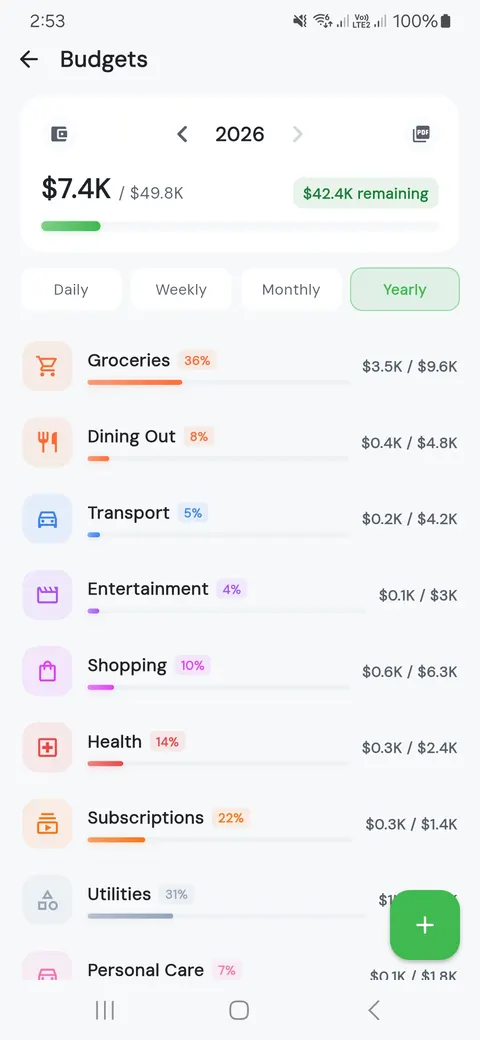
Monthly Budget Planner with Alerts
Set limits by category. Watch visual progress rings fill up. Get warned before you overspend — not after.
- 📈 Visual progress rings
- 🎯 Daily, weekly, monthly, yearly
- 🔔 Overspend alerts
- 📊 Budget vs. actual at a glance
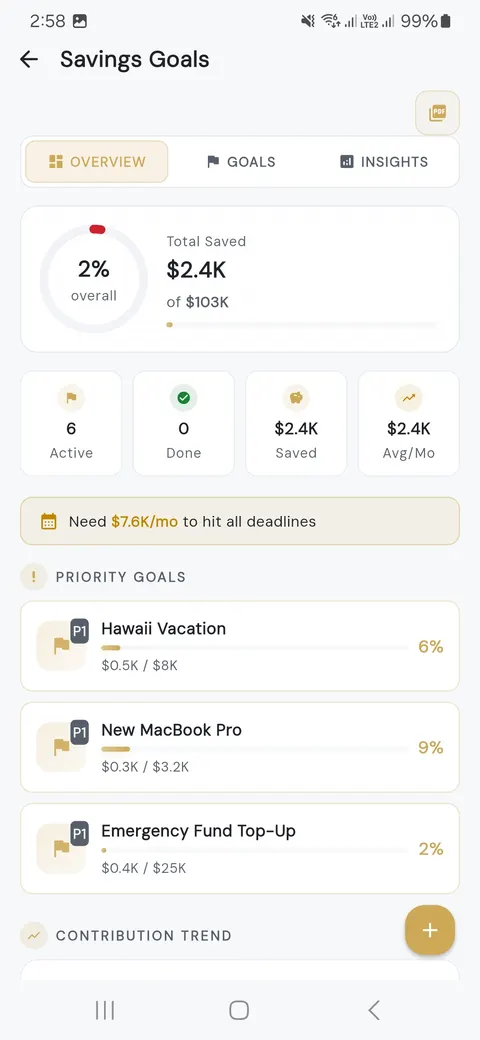
Savings Goal Tracker with Milestones
Vacation. Emergency fund. Down payment. Set the target, track daily progress, and watch your savings grow in real time.
- 🎯 Custom targets & deadlines
- 📅 Smart projections
- 💰 Visual progress tracking
- 🏆 Milestone rewards
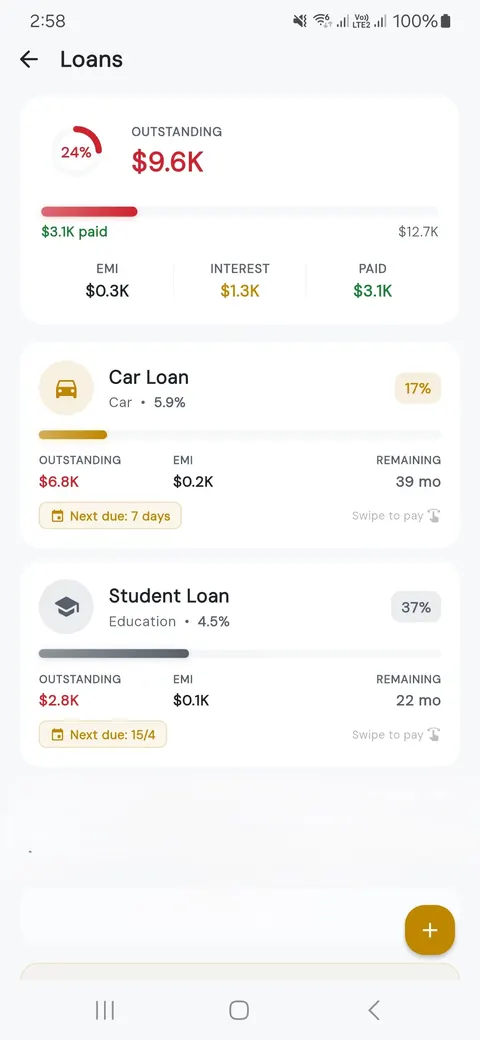
Loan & EMI Payment Tracker
Track every loan, EMI, and credit card. See interest breakdowns, remaining payments, and your exact payoff date — all in one place.
- 💲 EMI schedules at a glance
- 🏦 Interest vs. principal breakdown
- 💳 Credit card utilization
- 📅 Payoff countdown
Budget App FAQ — Frequently Asked Questions
100% free with all features unlocked — budgets, transactions, goals, loans, the works. Ads keep it free. Want them gone? One payment, ads disappear forever. No subscriptions. No tricks.
Bank-level secure. AES-256 encryption locks everything on your device. No servers. No accounts. No sign-ups. Your data never leaves your phone unless you choose encrypted Google Drive backup — and even then, it’s encrypted before upload.
Yes, 100% offline. Every feature works without internet — transactions, budgets, reports, everything. The only online parts are optional cloud backup and ads, both of which you can turn off.
You can clear all your data from Settings > Data Management > Delete All Data inside the app. Since we don't store anything on remote servers, deleting data from your device removes it permanently. For GDPR/legal deletion requests, visit our Delete Your Data page.
Budgeting365 supports 48 languages and automatically adapts to your device's language setting. You can also change the language manually in app settings.
Budgeting365 is the best free budget app for Android with all features unlocked — expense tracking, multi-account management, budget planning, savings goals, loan & EMI tracking, bill reminders, and PDF reports. It works 100% offline with AES-256 encryption, supports 48 languages and 50+ currencies, and requires no subscription or sign-up.
Yes. Budgeting365 is a fully offline budget app that works without any internet connection. All expense tracking, budget planning, savings goals, and financial reports work entirely on your device. The only optional online features are Google Drive backup and ads.
Yes. Budgeting365 includes a full loan and EMI tracker. You can add personal loans, home loans, car loans, and credit card debt with interest rates and tenure. The app calculates amortization schedules, shows interest vs. principal breakdowns, and tracks your exact payoff date.
No. Budgeting365 is completely free with no subscription required. All core features — budgets, expense tracking, savings goals, loan management, bill reminders, reports — are available at no cost. The app shows non-intrusive ads which can be removed permanently with a one-time purchase.
Unlike Mint or YNAB, Budgeting365 is 100% offline and free — no subscription fees, no bank linking, no cloud storage. Your data stays encrypted on your device with AES-256 encryption. It offers budget tracking, expense management, savings goals, loan & EMI tracking, and 48 language support without requiring an account or internet connection.
Budgeting365 makes it easy to start budgeting even with zero experience. The app comes with ready-made spending categories, guided budget setup, and a simple 3-second transaction logger. Just download, set your monthly income, and start tracking — no learning curve needed.
The 50/30/20 rule splits your income into 50% needs, 30% wants, and 20% savings. Budgeting365 lets you create custom budget categories that match this rule or any budgeting method you prefer — including zero-based budgeting and envelope budgeting.
Open Budgeting365, tap the + button, enter the amount, pick a category, and save. It takes 3 seconds. You can also use the home screen widget to log expenses without even opening the app. Every transaction is stored offline with AES-256 encryption.
Yes. Budgeting365 supports multiple accounts and custom categories, making it perfect for household budget tracking. Create separate accounts for family members, set shared budget limits by category, and track your entire household spending in one app.
Budgeting365 is the safest budgeting app available. It uses AES-256 encryption, works 100% offline, requires no account or sign-up, and stores zero data on remote servers. Your financial data never leaves your phone — making it the most private personal finance app for Android.
Yes. You can add credit card accounts, track utilization, monitor spending limits, and set payment reminders. The app shows outstanding balances, payment due dates, and helps you avoid interest charges by keeping all your credit card data organized in one place.
Budgeting Guides & Money Tips
Proven strategies to manage your money, save more, and reach your financial goals faster.
The 50/30/20 Budget Rule
Split your income into needs, wants, and savings with this simple, proven budgeting framework.
Read guide →How to Create a Monthly Budget
Set up your first monthly budget in 30 minutes and take control of your finances today.
Read guide →Build an Emergency Fund
Start from zero and build a safety net that protects you from unexpected expenses.
Read guide →Zero-Based Budgeting
Give every dollar a job and eliminate wasted spending with this powerful budgeting method.
Read guide →Track Your Expenses
Learn the most effective ways to track daily spending and spot where your money actually goes.
Read guide →Stop Living Paycheck to Paycheck
Break the cycle with actionable steps that help you save, even on a tight income.
Read guide →Download the Best Free Budget App for Android
No sign-up. No email. No subscription. Download Budgeting365 and start tracking expenses in under 30 seconds — your financial data never leaves your phone.